No products in the cart.



Introduction
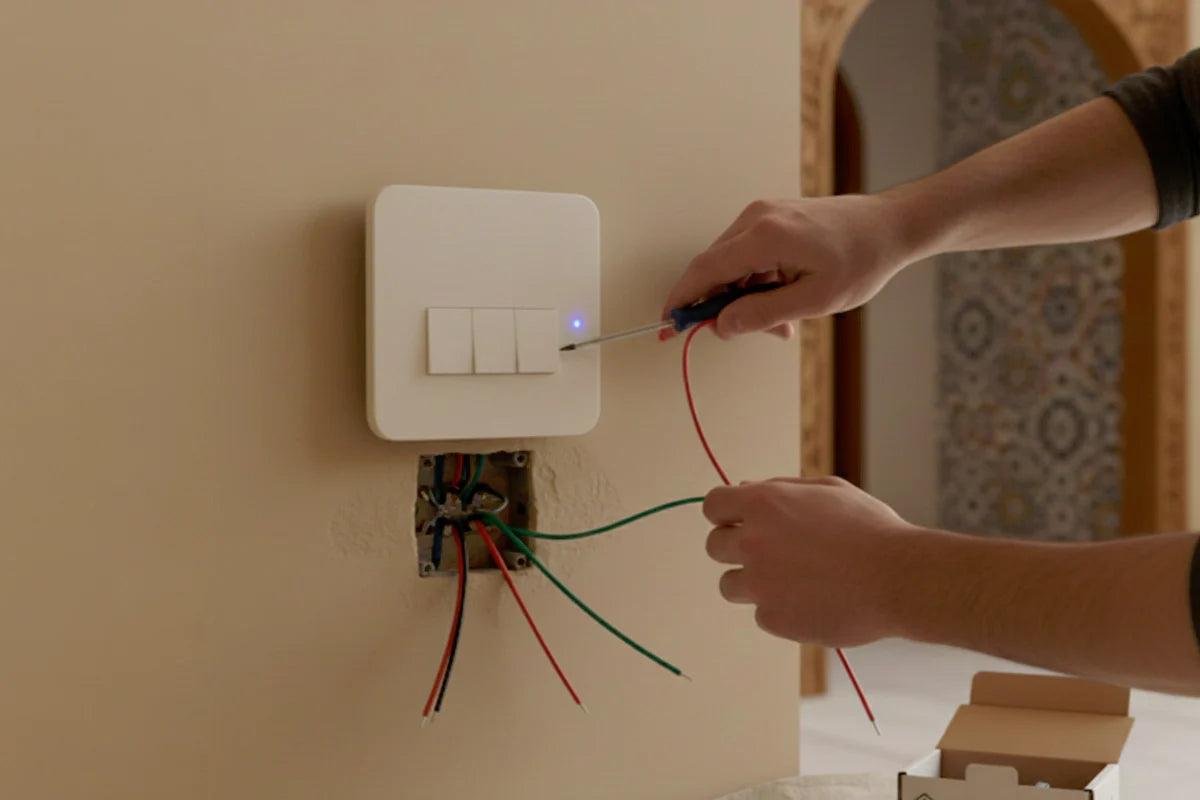
WiFi smart switches are one of the most popular smart home devices in Pakistan today. Many homeowners are switching from traditional switches to smart switches because they offer convenience, energy savings, and modern control through smartphones. However, many beginners feel confused about how to install a WiFi smart switch properly.
The good news is that installing a WiFi smart switch is not very complicated if done correctly. With the right tools, proper wiring, and basic safety precautions, you can easily upgrade your home with smart switches.
In this detailed guide, you will learn how to install a WiFi smart switch step-by-step, what tools you need, common mistakes to avoid, and important safety tips. This guide is designed especially for beginners who want to start their smart home journey in Pakistan.
If you are planning to upgrade your home, you can explore reliable and affordable WiFi smart switches at https://zzmarts.com and choose the perfect model for your needs.
What Is a WiFi Smart Switch?
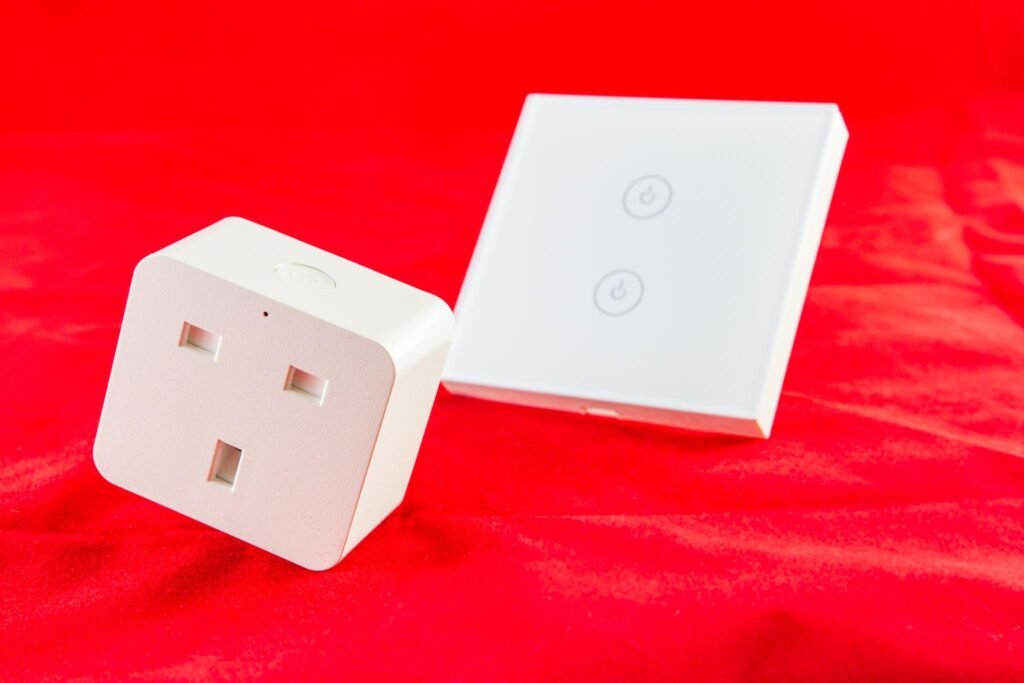
A WiFi smart switch is an advanced electrical switch that connects to your home WiFi network. It allows you to control lights, fans, and appliances using your smartphone from anywhere.
Unlike traditional switches that require manual operation, smart switches allow remote control through apps like:
- Tuya Smart
- Smart Life
These apps are commonly used in Pakistan and are easy to operate.
WiFi smart switches usually come in different types such as:
- 1 Gang Switch – Controls one device
- 2 Gang Switch – Controls two devices
- 3 Gang Switch – Controls three devices
- 4 Gang Switch – Controls multiple devices
Choosing the right type depends on your needs and the number of appliances you want to control.
Tools Required for Installation
Before starting installation, make sure you have the correct tools. Using proper tools makes the installation safe and easy.
Here are the basic tools required:
- Screwdriver (Flat and Star)
- Electrical Tester
- Insulation Tape
- Wire Cutter
- Smart Switch
- Mobile Phone with WiFi
Having these tools ready will save time and reduce installation mistakes.
Important Safety Precautions Before Installation
Safety should always be your first priority when working with electrical devices. Even a small mistake can cause damage or injury.
Before installing a WiFi smart switch, follow these safety steps carefully.
First, always turn OFF the main power supply from the distribution board. This prevents electric shock during installation.
Second, use an electrical tester to confirm that there is no electricity flowing through the wires.
Third, avoid touching bare wires with wet hands. Always keep your hands dry.
Fourth, if you are not confident in handling electrical wiring, it is strongly recommended to hire a professional electrician.
Taking these precautions will ensure safe installation and protect your home.
Step-by-Step Installation of WiFi Smart Switch
Now let’s go through the complete installation process step-by-step.
Step 1 — Turn Off the Main Power Supply
This is the most important step.
Go to your home’s main electrical board and switch OFF the main power supply. After turning it off, test the wires using an electrical tester to ensure there is no electricity.
Never skip this step.
Step 2 — Remove the Old Traditional Switch
Using a screwdriver, remove the screws holding the traditional switch plate.
Carefully pull the switch out from the wall box. You will see multiple wires connected to the switch.
Take note of how wires are connected before removing them.
If possible, take a photo of the wiring for reference.
Step 3 — Identify the Wires
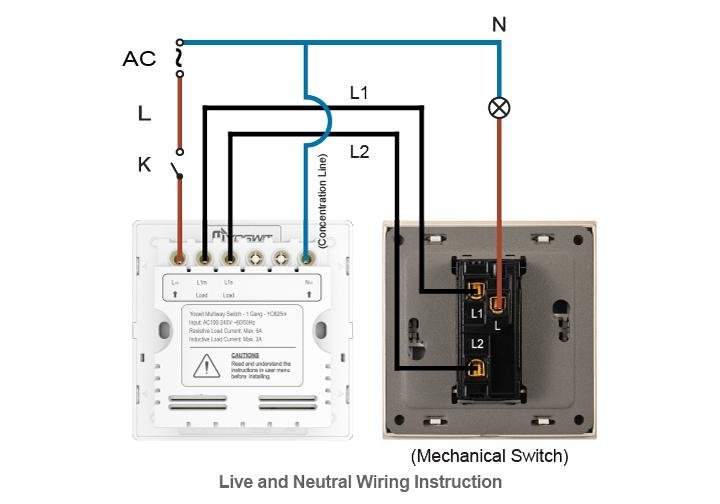
Most WiFi smart switches require three main wires:
- Live Wire (Phase)
- Neutral Wire
- Load Wire
The live wire supplies power, the neutral wire completes the circuit, and the load wire connects to the appliance.
Some older houses in Pakistan may not have a neutral wire. In that case, you may need special switches designed without neutral wiring.
Correct identification of wires is very important.
Step 4 — Connect Wires to the Smart Switch
After identifying the wires, connect them to the correct terminals on the smart switch.
Usually, the terminals are labeled as:
- L (Live)
- N (Neutral)
- L1 (Load)
Insert the wires into the correct terminals and tighten them using a screwdriver.
Make sure wires are firmly connected and not loose.
Loose connections can cause malfunction or damage.
Step 5 — Fix the Smart Switch into Wall Box
After wiring is complete, carefully place the smart switch into the wall box.
Secure it using screws.
Make sure the switch sits properly and does not move.
Then attach the front glass or touch panel cover.
Step 6 — Turn On the Power Supply
Go back to the main electrical board and turn ON the power supply.
Check if the smart switch lights up.
If the indicator light turns ON, the switch is ready for setup.
Step 7 — Connect Smart Switch to WiFi
Now comes the smart part.
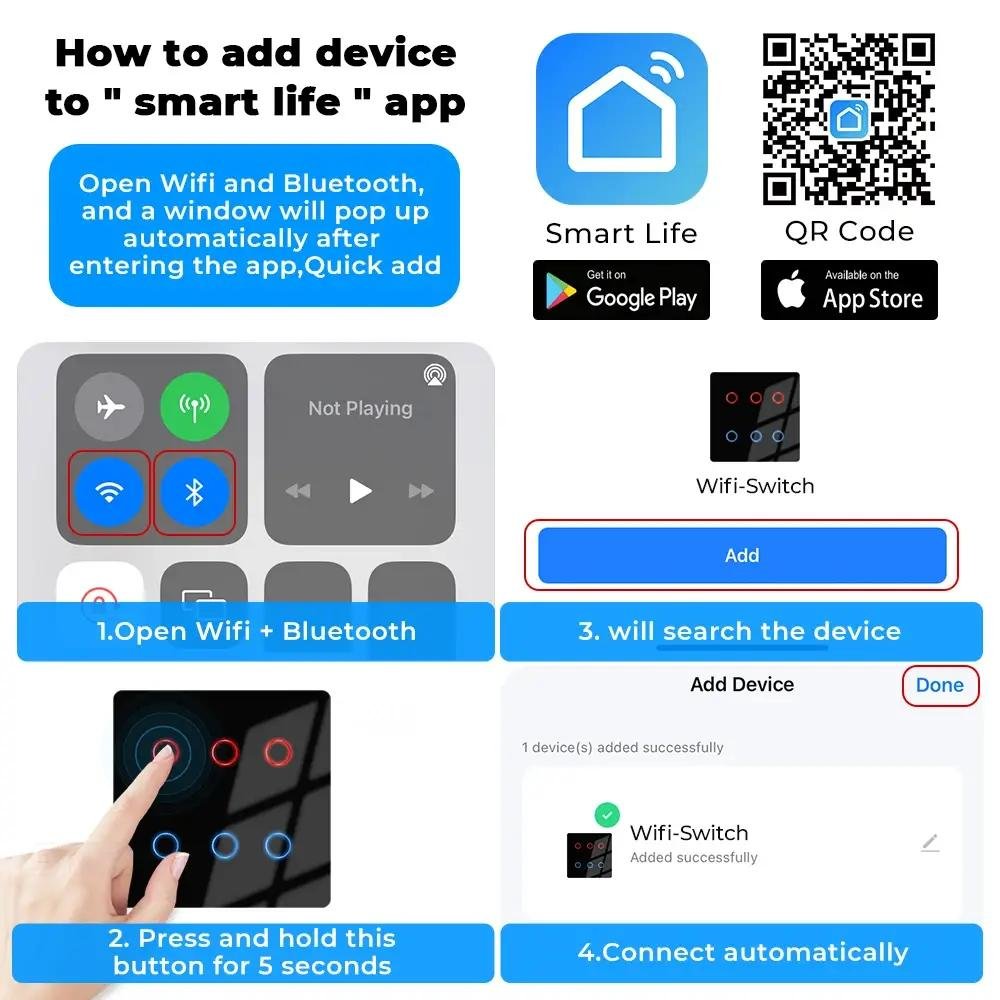
Download the mobile app:
- Tuya Smart
OR - Smart Life
These apps are widely used with smart switches.
Open the app and follow these steps:
- Turn ON pairing mode on the switch
- Select “Add Device”
- Enter WiFi password
- Connect the device
Within a few seconds, the switch will connect to your WiFi.
Step 8 — Test the Smart Switch
After connecting the switch to WiFi, test its functions.
Turn the switch ON and OFF using:
- Mobile app
- Touch panel
Check if the connected appliance works properly.
If everything functions correctly, installation is complete.
Benefits of Installing WiFi Smart Switches
Installing WiFi smart switches provides several benefits that improve daily life.
One major advantage is convenience. You can control lights without leaving your bed or sofa.
Another benefit is energy saving. Many people forget to turn OFF lights, which increases electricity bills. With smart switches, you can turn OFF devices remotely.
Security is also improved. You can schedule lights to turn ON automatically when you are not at home, making the house look occupied.
Modern appearance is another benefit. Smart switches give your home a stylish and advanced look.
If you’re looking for high-quality smart switches that are reliable and easy to install, visit https://zzmarts.com to explore the latest smart home products available in Pakistan.
Common Installation Mistakes to Avoid
Many beginners make small mistakes that cause problems later.
One common mistake is incorrect wiring. Connecting wires to the wrong terminals can damage the switch.
Another mistake is using weak WiFi signals. Smart switches require stable internet connections.
Skipping safety precautions is also dangerous. Always turn OFF power before installation.
Using low-quality products can also create issues such as overheating or connection failure.
Choosing reliable products reduces these risks.
Troubleshooting Common Problems
Sometimes users face minor issues after installation.
Here are common problems and solutions.
If the switch does not turn ON, check power supply and wiring connections.
If WiFi connection fails, move the router closer to the switch.
If the app cannot detect the device, reset the switch and reconnect.
Most issues are simple and can be fixed easily.
Where WiFi Smart Switches Should Be Installed
WiFi smart switches can be installed in many areas of your home.
Common places include:
- Bedrooms
- Living rooms
- Kitchens
- Offices
- Shops
In bedrooms, they allow control of lights without getting out of bed.
In offices, they help manage lighting schedules efficiently.
They are suitable for both residential and commercial use.
Why WiFi Smart Switch Installation Is Growing in Pakistan
Smart home technology is growing rapidly in Pakistan. Many people are adopting smart switches because they are affordable and easy to use.
Increasing electricity prices are also encouraging people to use smart devices for better energy management.
Modern homes are now being designed with smart technology in mind.
WiFi smart switches are becoming a standard feature in new houses.
Before You Install WiFi Smart Switch: Safety Checklist
- Turn off the circuit breaker for that switch before opening the wall plate
- Confirm a neutral wire is present in the switch box
- Label existing wires with tape before disconnecting anything
- Have the Tuya or Smart Life app downloaded and your WiFi password ready
Frequently Asked Questions
Is it safe to install WiFi smart switch myself?
If you are comfortable working with basic home wiring and always turn off the breaker first, most people can install a WiFi smart switch themselves. If you are unsure about your wiring, have an electrician check it first.
What if there is no neutral wire in my switch box?
Some smart switches are designed to work without a neutral wire, but most standard WiFi switches need one. Check the product specifications before buying if your home has older wiring without a neutral at the switch point.
Why will my new smart switch not connect to WiFi?
This is usually a 2.4GHz vs 5GHz issue – most WiFi smart switches only connect to 2.4GHz networks, so make sure your phone is joined to the 2.4GHz band during setup if your router broadcasts both.
ZZ Marts sells WiFi smart switches in Karachi and Lahore, and our staff can help confirm compatibility with your wiring before you buy. Visit our Saddar Regal (Karachi) or Mashallah Center (Lahore) store, or browse online.
Conclusion
Installing a WiFi smart switch is one of the easiest ways to upgrade your home into a smart home. With simple wiring, proper setup, and stable WiFi, you can enjoy the benefits of remote control, automation, and energy savings.
For beginners, this is the best starting point in smart home automation. Once installed, many users continue adding more smart devices such as motion sensors and smart locks.
Smart home technology is no longer limited to luxury homes. It is becoming affordable and practical for everyday households in Pakistan.
Ready to install your first smart switch? Visit https://zzmarts.com today to buy reliable WiFi smart switches and start your smart home journey with confidence.
Related: Shop our full range of smart switches and sensors and smart touch switches and dimmers, or read about the Tuya smart home platform used to set them up.