Description
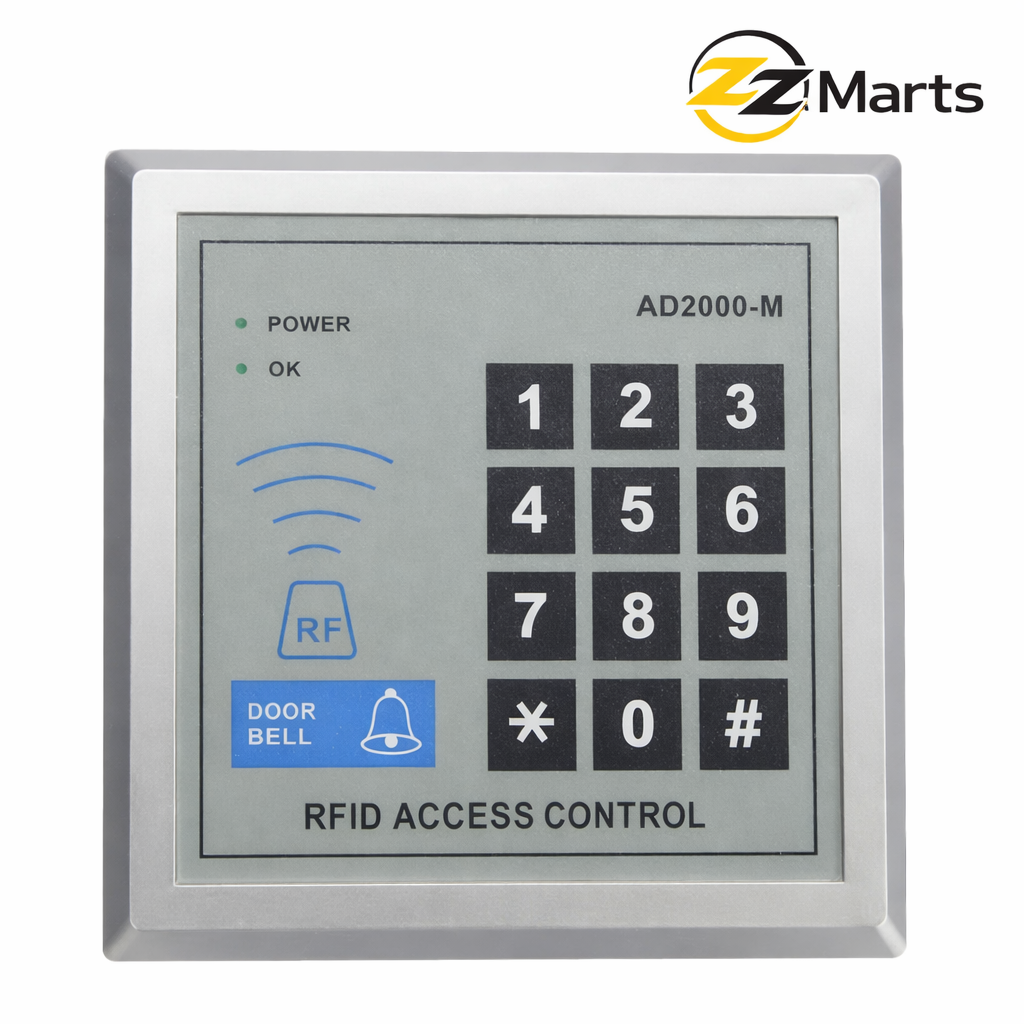
The SMQ-303 II RFID Access Control Keypad is a compact and reliable standalone access control system designed for secure door entry management.
It supports both RFID card access and PIN password entry, allowing flexible security options for homes, offices, shops, and commercial buildings.
With storage support for up to 500 user cards, it is ideal for small to medium-scale installations. The built-in doorbell button allows connection to an external bell for added convenience.
The device features LED indicators to display working status (Power / OK), ensuring easy monitoring and system operation.
Its durable keypad and strong outer casing make it suitable for long-term indoor or semi-outdoor installations.
Who this system is for. The SMQ-303 II is the standard choice for offices, clinics, warehouses, factories, and shops that need to control who enters a room without issuing physical keys. In Pakistani offices it is most often fitted on server rooms, accounts departments, stock rooms, and main entrance doors. It suits any situation where several people need access, staff change from time to time, and you want that access to be controlled rather than trusted.
Card or PIN, and why most businesses use both. The unit accepts an RFID card or a numeric PIN. Cards suit permanent staff who enter many times a day, since tapping a card is quicker than typing. PIN codes suit occasional visitors, contractors, and cleaning staff, because you can issue a code verbally without handing over hardware. Most businesses settle on cards for employees and a rotating PIN for everyone else, changing that PIN monthly or whenever a contractor finishes work.
The practical advantage over a key. When an employee leaves a business with mechanical locks, you either trust that no copy was made or you pay to change the cylinder. With this system you delete their card from the unit in a few seconds and the matter is closed. For any business with staff turnover, this single capability usually pays for the system within the first year.
What else you need for a complete installation. This is important, because the keypad alone will not lock a door. The keypad is the controller; it must be paired with a lock, and the lock type depends on your door. Glass and aluminium doors normally take a magnetic lock, which holds the door shut electromagnetically. Wooden doors normally take an electric bolt lock, which throws a bolt into the frame. You will also need an exit button mounted inside the room so people can leave without a card, and a 12V power supply to run everything. ZZ Marts stocks all of these components and can supply a complete matched kit, which avoids the common situation of an electrician arriving and discovering a part is missing.
Choosing between fail-safe and fail-secure. This decision matters more than most buyers realise. A fail-safe lock, typically a magnetic lock, releases and opens when power is lost. A fail-secure lock stays locked when power is lost. Fire exits and any door people must escape through should generally be fail-safe, so nobody is trapped during an emergency or a power cut. A server room or store room where security matters more than egress may suit fail-secure. Consider load shedding when deciding, and tell us the door’s purpose so we can advise correctly.
Standalone rather than networked, and why that is often right. This unit stores its users on the device itself. There is no server, no software licence, no internet connection, and no monthly fee. For one or two doors this is the sensible, economical choice and it keeps working whether or not your internet does. The trade-off is that each door is managed at its own keypad, and you do not get centralised reports. If you reach the point of managing many doors, or you need attendance records, a networked controller becomes worthwhile and we can quote one.
Installation and wiring notes. Any electrician familiar with access control will find this straightforward, but a few details prevent problems. Run the cable from the keypad to the lock inside conduit rather than surface-clipping it, since an exposed cable is an obvious weak point. Mount the keypad on the secure side of the door where practical. Ensure the power supply is rated for the lock you have chosen, as magnetic locks in particular draw continuous current. Finally, test the exit button and the emergency release before signing off the job.
Power backup and load shedding. Because the lock and controller need power, plan for outages. A small backup supply or UPS keeps the door functioning through load shedding. Without one, a fail-secure lock will keep the door locked and a fail-safe lock will release it, and neither may be what you want at that moment. This is inexpensive to add at installation and awkward to retrofit.
Card management in practice. Issue one card per person rather than sharing cards between shifts, otherwise you lose any meaningful control over who entered. Keep a simple written register of which card number belongs to whom. When a card is lost, delete it from the unit immediately rather than waiting, since a lost card is functionally identical to a lost key until it is removed.
Who should not buy this. If you need attendance reports for payroll, look at biometric attendance machines instead. If you need to manage many doors centrally or unlock doors remotely for visitors, a networked system is the correct choice. If your door is fully exposed to driving rain, discuss placement and weather protection with us first.
Does it work during a power failure? The unit needs power. Pair it with a backup supply or UPS so the door keeps functioning during load shedding, and choose fail-safe or fail-secure locking according to how you want the door to behave when power is lost.
Can it record attendance? This model is designed for access control rather than timekeeping. Ask us about biometric attendance machines if you need attendance reports.
How many users can it store? Capacity is comfortably sufficient for typical small and medium offices. Contact us for the exact figure on current stock, as specifications vary between production batches.
Which lock should I order with it? Send us a photograph of your door on WhatsApp. We will tell you whether a magnetic lock or an electric bolt lock is correct, and what power supply size you need.
Can one keypad control two doors? No. This is a single-door controller. Each door needs its own unit, or a multi-door networked controller if you prefer central management.
Buying from ZZ Marts. Available from our Karachi (Saddar) and Lahore stores with delivery across Pakistan, supplied by Zam Zam Traders, trading in security hardware since 2005. We would rather specify the job correctly than sell you a keypad that arrives without the lock, button, and power supply it needs. Message us on WhatsApp with your door details and we will put together a complete list.
Technical Specifications
Product Model: SMQ-303
Access Type: RFID Card + PIN Code
User Capacity: Up to 500 Cards
Operating Voltage: 12V DC
Material: ABS / Metal (Model Dependent)
Indicators: Power / Status LED
Doorbell Output: Supported
Installation Type: Surface Mount
Application: Door Access Control
🎯 Applications
Residential Homes
Office Buildings
Shops & Stores
Warehouses
Schools
Clinics
Commercial Entry Points
nting Screws
User Manual
❓ FAQs
Q1: How many users can it store?
It supports up to 500 RFID user cards.
Q2: Can I use password instead of card?
Yes, it supports both PIN code and RFID card access.
Q3: Does it require internet?
No, it works as a standalone access control unit.
Q4: Can it connect to an electric lock?
Yes, it can control electric locks and magnetic locks.
Q5: Is it suitable for outdoor use?
It is suitable for indoor or covered outdoor installation.







Reviews
There are no reviews yet.