No products in the cart.


Introduction
Monitor hydraulic mounts are excellent for improving comfort, saving desk space, and creating a modern workspace. However, like any adjustable product, users may face some common problems after installation. These issues are usually easy to fix if you understand the cause.
Many people think their monitor arm is faulty when the screen starts sagging, tilting, or moving unexpectedly. In most cases, the problem is related to incorrect tension adjustment, poor installation, wrong monitor weight, or loose screws.
In this complete troubleshooting guide, we will explain the most common monitor arm problems and how to fix them step by step. This guide is helpful for office users, gamers, students, and anyone using a gas spring or hydraulic monitor mount.
If you are looking for reliable monitor hydraulic mounts with smooth adjustment and strong build quality, visit https://zzmarts.com to explore high-quality options for your workspace.
Problem 1: Monitor Arm Keeps Dropping Down

One of the most common problems is the monitor arm slowly dropping down after adjustment. This usually happens when the gas spring tension is too loose for the monitor’s weight.
Most hydraulic monitor arms have a tension adjustment screw. This screw controls how much force the arm uses to hold the monitor in place.
To fix this issue, use the provided Allen key and tighten the tension screw slowly. Adjust it step by step until the monitor stays at the desired height.
Avoid tightening too much at once because excessive tension can make movement stiff.
If the monitor still drops after adjustment, check whether your monitor weight is within the supported range of the arm.
Problem 2: Monitor Arm Moves Up by Itself
Sometimes the monitor arm moves upward instead of staying in position. This usually means the gas spring tension is too tight.
When tension is higher than required, the arm pushes the monitor upward.
To fix this problem, loosen the tension screw slightly using the Allen key. Move the monitor up and down after each adjustment to test balance.
The correct tension setting allows the monitor to stay in place without moving up or down automatically.
Proper tension balance is very important for smooth performance.
Problem 3: Monitor Tilts Forward or Falls Down

If your monitor tilts forward or does not stay upright, the tilt joint may be loose.
This issue usually occurs when the monitor is heavier than expected or the tilt screw is not tightened properly.
To fix it, locate the tilt adjustment screw behind the monitor mounting plate.
Tighten it carefully until the screen stays in the correct position.
Also check that the VESA plate is securely attached to the monitor.
Loose VESA screws can cause unstable movement.
Problem 4: Monitor Arm Feels Too Stiff
A monitor arm may feel stiff if the tension is too tight or if joints are over-tightened.
This makes it difficult to move the monitor smoothly.
To fix this, loosen the tension screw slightly and test the movement.
Also check all arm joints and make sure they are not tightened excessively.
A good monitor arm should move smoothly while still holding the monitor securely.
Problem 5: Monitor Arm Feels Loose or Wobbly

If your monitor arm feels loose or wobbly, the problem may be with the desk clamp or mounting base.
Check the clamp under the desk and tighten it properly.
Make sure the desk surface is strong enough to support the monitor arm.
Thin or weak desks may cause instability.
If needed, use a reinforcement plate under the clamp to distribute weight evenly.
This improves stability and protects the desk surface.
Problem 6: Monitor Does Not Fit the Arm
Sometimes users buy a monitor arm and later discover that their monitor does not fit.
This usually happens because the monitor does not support VESA mounting.
Most monitor arms require VESA patterns such as:
- 75x75mm
- 100x100mm
Check the back of your monitor for mounting holes.
If your monitor does not have VESA holes, you may need a VESA adapter.
Always check compatibility before buying.
Problem 7: Monitor Arm Cannot Support Heavy Monitor

Every monitor arm has a weight limit.
If your monitor is heavier than the supported range, the arm may sag, tilt, or fail to hold position.
To fix this, check your monitor’s weight and compare it with the arm’s capacity.
If the monitor is too heavy, you need a heavy-duty monitor arm.
Using an underpowered arm can damage both the mount and the monitor.
Problem 8: Dual Monitors Are Not Aligned
Dual monitor arms can sometimes be difficult to align perfectly.
This usually happens when monitors are different sizes or weights.
To fix this, adjust each arm separately.
Start by setting both monitors at the same height.
Then adjust tilt and angle.
If monitors are different models, perfect alignment may not be possible, but you can still create a comfortable setup.
Problem 9: Cable Management Looks Messy

One of the main reasons people buy monitor arms is to create a clean desk setup.
However, cables can still look messy if not managed properly.
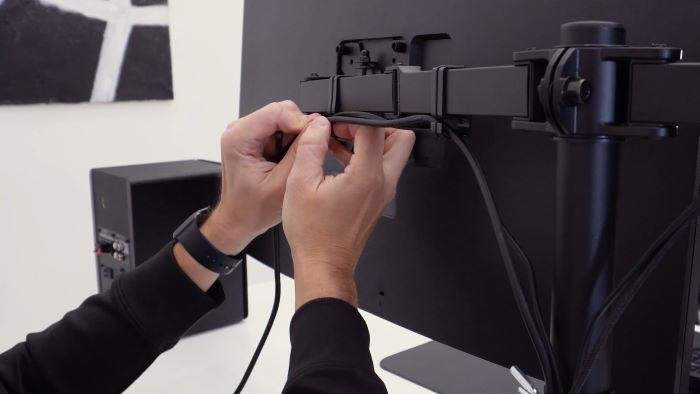
Most monitor arms include cable clips or channels.
Route monitor power cables and HDMI cables through these clips.
Use cable ties if needed.
Clean cable management improves desk appearance and prevents cable pulling.
Problem 10: Desk Clamp Leaves Marks
Some monitor arms may leave marks on wooden desks if the clamp is tightened too strongly.
To prevent this, use a protective pad between the clamp and desk surface.
A reinforcement plate can also help distribute pressure.
This protects the desk and improves stability.
Tips to Avoid Monitor Arm Problems
To prevent common issues, follow these tips:
- Check monitor weight before buying
- Confirm VESA compatibility
- Tighten screws properly
- Adjust gas spring tension correctly
- Use a strong desk surface
- Manage cables neatly
These simple steps improve performance and durability.
Why Choosing a Quality Monitor Arm Matters
Low-quality monitor arms often become loose, unstable, or difficult to adjust.
A good monitor arm provides:
- Strong support
- Smooth movement
- Stable positioning
- Better cable management
- Longer lifespan
If you want a reliable monitor hydraulic mount for your office, gaming setup, or home workspace, visit https://zzmarts.com to explore durable and ergonomic options.
Monitor Arm Problems Troubleshooting: Quick Reference
| Problem | Likely fix |
|---|---|
| Arm drifts or sags downward | Tighten the tension adjustment screw on the arm joint |
| Monitor will not stay level | Check the VESA plate is fully seated and screws are tight |
| Clamp will not grip desk | Confirm desk thickness is within the clamp range, add a grommet mount if not |
| Arm will not extend/retract fully | Check for wall or desk-ridge clearance blocking the movement |
Frequently Asked Questions
Why does my monitor arm keep drooping?
This is almost always a tension issue – the gas spring or tension screw needs adjusting to match your monitor’s actual weight. Most arms have a small hex or Phillips screw at the joint specifically for this.
Can a monitor arm problem damage my monitor?
A loose or poorly tensioned arm can cause the monitor to drop suddenly, which can damage the screen. If you notice drift or looseness, address it before continued use rather than leaving it.
When should I replace a monitor arm instead of fixing it?
If the tension mechanism itself is worn out and no longer holds adjustment even after tightening, or a plastic joint has cracked, replacement is usually more practical than repair.
ZZ Marts sells replacement monitor arms and mounts in Karachi and Lahore if a repair is not practical. Visit our Saddar Regal (Karachi) or Mashallah Center (Lahore) store, or browse online.
Conclusion
Monitor hydraulic mounts are very useful, but proper installation and adjustment are important for the best experience. Most common problems such as sagging, stiffness, wobbling, and poor alignment can be fixed easily with simple adjustments.
Understanding your monitor’s weight, VESA compatibility, and desk strength helps prevent most issues before they happen.
A properly adjusted monitor arm improves comfort, saves desk space, and creates a professional workspace.
Ready to upgrade your setup with a reliable monitor arm? Visit https://zzmarts.com today and discover high-quality monitor hydraulic mounts designed for smooth adjustment and long-term stability.